Appearance
Version 6.6.0
Release Date: March 2026
New Features
Business Analysis Profile
A dedicated domain profile for Business Analysts and requirements engineers. Plan and evaluate requirements against multiple scenarios, identify gaps, and visualize health at a glance.
- Scoring & Scenarios: Define evaluation scenarios and score requirements (Must Have, Should Have, etc.). Termboard calculates weighted scores automatically.
- Heatmap Visualization: The canvas highlights requirements using a color-coded heatmap based on scenario coverage and score — instantly revealing which areas need attention.
- Semantic Checks: Automatic validation flags requirements with multiple evaluations in the same scenario, unscored items, and other consistency issues.
- Templates: Ready-to-use templates for Tool Selection and Implementation Tracking to get started quickly.
More details in the Business Analysis how-to guide.
Staging Area
A new workflow for managing large imports and brainstorming sessions. The Staging Area lets you prepare terms in a sidebar before placing them on the canvas.
- Import to Staging: Load data from TermStorm, Excel, or JSON directly into the staging list.
- Drag & Drop: Move terms from the staging list to any position on the canvas.
- Bulk Deployment: Deploy multiple terms at once to the center of your view.
- Canvas Cleanup: Use "Stage Orphans" to quickly move disconnected terms back to staging.
More details in the Staging Area documentation.
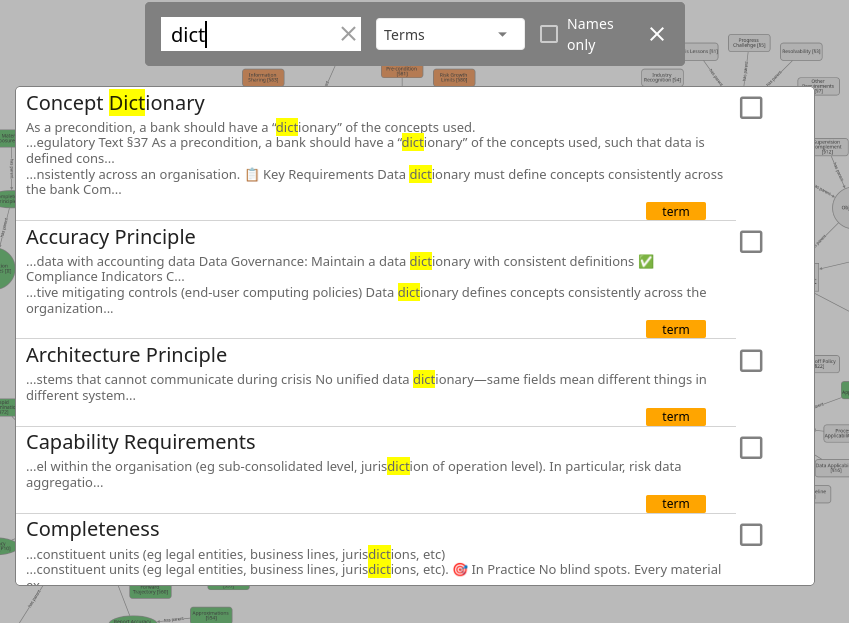
Enhanced Search Snippets & Highlighting
- Match Snippets: When a search matches text in descriptions or additional info, a relevant snippet is shown directly in the results list.
- Dynamic Highlighting: Search terms are highlighted inside context snippets, making it clear why a result was returned.
- Improved Relevance: Results are prioritized by match location.
Smarter AI Context Export (Compact Format)
The Compact Format export now generates richer context for AI assistants, making AI interactions significantly more accurate.
- AI Model Guide: When a domain profile defines term type descriptions or Extra Field purposes, a
# MODEL GUIDANCEsection is automatically prepended to the export, giving the AI the vocabulary it needs. - Field Descriptions: You can now add a description to each Extra Field (in the Extra Fields dialog), which is included in the guidance block so the AI understands what to fill in.
- Smart Placeholders: Fields that don't apply to a specific term type are exported as
-, keeping the table structure clean and unambiguous. - Cardinality in Relation Exports: Option to include source and target cardinality columns in the relation summary.
- Import round-trip: Importing now skips Markdown-style table divider rows, so you can paste AI-generated Markdown tables directly.
See the Compact Format documentation for details.
Improvements
- OWL Export: Enriched with full ontology metadata (title, description, author, dates) and SKOS
prefLabelannotations. - Hierarchy View: Term type icons are now shown in the hierarchy tree for faster visual orientation.
- Context Menu Submenus: Expand/Collapse and selection actions are now grouped in submenus to keep the context menu tidy.
- Reverse Relation Direction: Select one or more relations and reverse their direction in one click via the context menu.
- Extra Field Roles: The Extra Fields dialog now has a dedicated "Usage & Activation" section for configuring field roles (label on node, bubble set, line color/style, etc.) in one place.
See the Extra Fields documentation for details.