Appearance
Semantic Checks
Semantic Checks help you maintain high-quality, consistent models by identifying potential issues in your terms and relations. These checks are primarily designed for Semantic Modeling but can be applied to other types of graphs as well.
Overview
Access semantic checks via
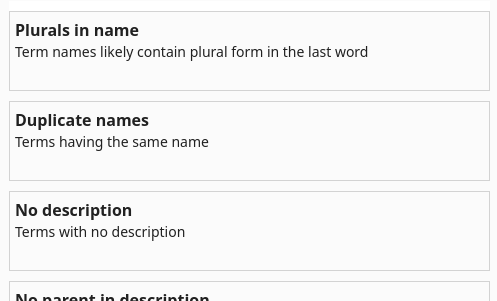
When you select a check, you'll see a screen with the check title and two icons:

- Refresh icon (): Recalculates the terms that match the check. Use this after making changes to your graph while the sidebar is open
- Select terms (): Selects all matched terms (shown in the list below) in the graph
- Filter icon () (Poor Description only): Allows you to "mute" specific sub-checks to focus on certain quality issues. A blue dot indicates active filters.
Prerequisites
Some checks require specific configuration to work properly:
- Relation Types: Map your relations to types like "Generalization" and "Attributive" in Relation Type settings
- Term Types: Classify terms as "Concept" or "Property" in the Term Details tab
- Inheritance: Enable in Document Settings for checks involving parent-child relationships
Result Sort Order
When viewing check results, findings are sorted consistently:
- Scored checks: Ordered by issue severity or score (worst issues first). When scores are equal, items are sorted alphabetically (A-Z).
- Similar term names: Highest similarity percentage first.
- Poor Description Quality: Lowest quality score first.
- Unscored checks: Ordered alphabetically (A-Z) by term name (or the first term in a pair).
- Applies to: Plural in name, Synonym conflicts, No parent in description, No relations, Redundant (transitive) relation, Multi parent, Circular Hierarchy, Bidirectional relations, Potential property (name), Properties without Attributive relation, Concepts without Hierarchical relation, Disconnected graph islands, and Entity constraint issues.
Model Quality Score & Audit Report
The top of the Semantic Checks panel features a Model Quality Scorecard (available in the Standard profile) that evaluates overall ontology health on a 0–100 scale with a corresponding letter grade (A+ to F).
Evaluation Pillars
The overall quality score synthesizes 17 semantic checks, graph topology, and definition coverage across four weighted pillars:
- Structural Integrity (35% weight): Taxonomical validity, circular dependency absence, single-inheritance cleanliness, and graph connectivity (penalizes cycles, duplicate terms, and disconnected islands).
- Definition Completeness (25% weight): Definition coverage ratio and depth (penalizes missing descriptions, placeholder text, circular phrasing, or missing parent categorization).
- Relational Consistency (25% weight): Correct relation usage (penalizes synonym clashes, redundant transitive connections, unintended bidirectional edges, loose properties, and duplicate or conflicting entity business rules).
- Graph Richness & Density (15% weight): Graph maturity, relational depth, and average connectivity degree.
| Score Range | Grade | Verdict |
|---|---|---|
| 95 - 100 | A+ | Exemplary Architecture |
| 85 - 94 | A | Production Ready |
| 70 - 84 | B | Good Working Draft |
| 50 - 69 | C | Needs Attention |
| < 50 | F | Structural Risk |
On-Demand Calculation
To preserve smooth canvas interactions, scoring is computed on-demand rather than on every canvas edit. The score is displayed as "Score not available" until you:
- Click Run all checks in the Semantic Checks header, or
- Open the audit dialog and click Calculate Score Now.
Model Quality Audit Dialog
Clicking the scorecard opens the full Model Quality Audit dialog:
- Executive Overview: Gauge breakdown of the four pillars alongside key graph metrics (node count, relation count, average degree, hierarchy depth, description coverage).
- Action Items: Prioritized list of suggested fixes ranked by estimated score recovery impact. Clicking any item jumps directly to the corresponding check tab in the sidebar.
- Score Evolution: Snapshot history tracking how model quality has progressed across revisions.
- Export Markdown Report: Download a structured Markdown report summarizing your model audit for stakeholders and governance reviews.
Profile Availability
Model Quality Scoring is calibrated for the Standard terminology profile (Aristotelian taxonomy). For other profiles (such as MindMap or Business Architecture), the scorecard is hidden, as those profiles use domain-specific guidelines or dedicated scoring tools (such as Business Architecture Scoring).
Plural in name
Lists all term names that are in plural form.
Why this matters
While there might be rare exceptions or specific modeling methodologies that allow for plural terms in certain contexts, the general consensus in semantic modeling favors singular term names. This promotes a cleaner, more consistent, and less ambiguous representation of your domain knowledge:
Focus on the Concept: Singular terms represent a distinct concept. "Customer" directly refers to the idea of a customer, with its inherent properties and relations, making the model more abstract and focused on fundamental building blocks.
Avoid Ambiguity: Plural forms can be ambiguous. Does "Products" refer to the general concept or a specific collection of multiple instances? Using the singular "Product" clearly denotes the concept itself. Multiple instances are represented through relations (e.g., a "Customer" has many "Order" instances).
Consistency and Predictability: Employing singular forms creates a more consistent and predictable modeling style. Once established, it becomes easier for everyone to understand terms and create new ones following the same pattern.
Alignment with Instance Representation: In data storage and programming contexts, you typically deal with individual instances of concepts. Using singular terms aligns better with how you'll represent these individual records or objects.
Easier Relation Naming: Singular terms lead to more natural and readable relation names. For example,
Customer places Orderis clearer than "Customers place Orders."Reduced Redundancy: When defining properties of a term, you describe characteristics of a single instance. It's more natural to say "Product has a Name" rather than "Products have a Name."
What to do
- Review each term flagged by this check
- Rename plural terms to their singular form (e.g., "Customers" → "Customer")
- Verify that relations involving renamed terms still make sense
- Update any descriptions that reference the old plural name
Modeling Principle
Think of your semantic model as a vocabulary for describing your domain. Just as you define the meaning of a single word, you define the meaning of a single concept. You then use relations to express how multiple instances of these concepts interact.
Similar term names
Lists terms with the same name or very similar names (Levenshtein distance < 3) that may be duplicates, typos, or need differentiation.
Why this matters
Duplicate names
Confusion and Ambiguity: When two different terms share the same name, it becomes impossible to know which concept is being referenced in any given context. This leads to misinterpretations, errors in reasoning, and difficulties in communication. For example, discussing "Account" when it could refer to either a user account or a financial account creates confusion.
Hindrance to Logical Reasoning: Semantic models are often used for logical inference and querying. Without unique names, it becomes difficult to formulate precise queries or draw accurate conclusions. The system cannot distinguish between identically named concepts.
Data Integration Challenges: When mapping your semantic model to underlying data sources, duplicate term names create significant problems. How do you know which database table or data field corresponds to which concept if they share the same name?
Tooling and Technology Limitations: Many semantic modeling tools rely on unique identifiers for terms. Duplicate names can cause errors, warnings, or unexpected behavior within these systems. This check uses edit distance algorithms to find term pairs that are nearly identical, helping you maintain a clean, professional model:
Very similar names
Catch Typos: The most common reason for similar names is simple typing errors. Finding these helps maintain a professional, error-free model.
Identify Near-Duplicates: Sometimes terms are accidentally created with slightly different names ("Product Info" vs "ProductInfo") when they represent the same concept.
Highlight Ambiguity: Very similar names might indicate that two concepts need clearer differentiation. If "Account" and "Accounts" both exist, it's unclear whether they represent different concepts or if one is simply a plural form.
Improve Searchability: Similar names can make it harder to find the right term when searching or browsing the model.
How it works
This check uses the Levenshtein edit distance algorithm:
- Compares every term name with every other term name
- Calculates the edit distance (number of character changes needed to transform one name into the other)
- Flags pairs with an edit distance of less than 3
- Calculates a similarity percentage for each pair
- Groups results by similarity level:
- High (>85%): Very likely a typo or duplicate
- Medium (70-85%): Possibly related or needs review
- Low (<70%): Might be coincidentally similar
Example: "Customer" and "Costumer" have an edit distance of 1 (one letter different) and would be flagged as highly similar.
What to do
- Review each pair, starting with high similarity matches
- For typos:
- Fix the misspelled term name to match the correct one
- Merge or delete the incorrect term
- For duplicates:
- If both terms represent the same concept, consolidate their relations and delete one
- Update any descriptions referencing the deleted term
- For intentional differences:
- Make the names more distinct to avoid confusion (e.g., "User Account" vs "Financial Account")
- Add clarifying descriptions explaining the difference
- Use the filter dropdown to show only high, medium, or low similarity pairs
Critical Issue
Duplicate names are a fundamental modeling error that can cause serious issues in reasoning, integration, and communication. Address these immediately.
Start with High Similarity
Filter to show only high similarity pairs (>85%) first. These are most likely typos or duplicates that need immediate attention. Then work your way down to medium and low similarity matches.
Synonym conflicts
Lists terms with synonym collisions—where a term's synonym matches another term's canonical name, or where multiple terms share the exact same synonym.
Why this matters
Synonyms provide alternative labels for human search, concept discovery, and verbalization. When synonyms conflict, they create ambiguity:
- Ambiguous Search and Navigation: If Term A has a synonym "Client" and Term B is named "Client", searching or referencing "Client" points to two distinct concepts with different meanings.
- Broken Knowledge Disambiguation: When two distinct terms share the exact same synonym, downstream reasoning, data mapping, and text-matching algorithms cannot determine which underlying concept is intended.
- Unintended Conceptual Merging: Synonym collisions often indicate that two terms were modeled separately when they should be merged, or that an overly broad synonym was assigned to a specialized concept.
How it works
This check compares every term's synonym list against all term names and other synonym lists:
- Synonym matches term name: Flags when a synonym on Term A is identical to the canonical name of Term B.
- Shared synonym across terms: Flags when Term A and Term B both have the identical synonym in their synonym list.
Results show both affected terms and the conflicting synonym label.
What to do
- Open the Details tab in the term sidebar for the flagged terms.
- Decide the nature of the conflict:
- True duplicate concepts: If both terms describe the same concept, merge their relations into one term and delete the duplicate.
- Conflicting synonym: If the terms are distinct concepts, remove or rephrase the synonym on one or both terms so it uniquely refers to its intended concept.
- Refresh the check to verify the conflict is resolved.
Poor Description Quality
Lists terms with descriptions that are missing, too short, repeat the term name, contain placeholder text, or have other quality issues.
Why this matters
A good description should provide meaningful context and detail about what a term represents. This check identifies descriptions that fail to meet basic quality standards, helping you improve the overall documentation of your model:
Professional Documentation: High-quality descriptions make your model more professional and easier to understand for all stakeholders.
Knowledge Transfer: Good descriptions help new team members quickly understand the model without requiring extensive explanation.
Reduced Ambiguity: Detailed descriptions prevent misinterpretations and ensure everyone has the same understanding of each term.
Future Maintainability: Well-documented models are easier to maintain and evolve over time as requirements change.
Stakeholder Communication: Clear descriptions facilitate better communication with non-technical stakeholders and domain experts.
How it works
The quality analyzer examines multiple aspects of each description and assigns a score from 0-100 based on:
- Missing: Empty descriptions (most severe issue)
- Too Short: Under 20 characters
- Repeats Name: Just repeats the name (e.g., "Customer" for term "Customer")
- Starts with Name: Lazy prefix like "A Customer..."
- Circular: Description contains the term name itself (Self-referential definition)
- Anti-patterns: Generalizing words like "usually", "generally", "e.g.", "etc.", "includes", "for instance"
- Negative phrasing: Describes what it is not instead of what it is
- Placeholder Text: Contains "TODO", "TBD", "FIXME", etc.
- Generic Phrases: Starts with vague phrases like "is a type of" or "used for"
- One Word Only: Too brief
- Unexpanded Acronyms: Contains an acronym (2+ uppercase letters) that is not the term's name or synonym, which might need expansion to be widely understood
Each term receives a quality score badge:
- Poor (0-30): Multiple serious issues
- Fair (31-60): Some issues that should be addressed
- Good (61-100): Minor issues or stylistic suggestions
What to do
- Click on terms to expand and see the specific issues identified
- Review the current description shown in the preview
- Rewrite the description to:
- Provide sufficient detail
- Explain what the term represents, not just repeat its name
- Add proper punctuation and formatting
- Remove placeholder text
- Be specific about the term's role, purpose, or characteristics
- Reference the parent term if applicable (see No parent in description)
- Include examples when helpful to clarify the concept
- Refresh the check to verify improvements
Configuring Quality Checks
You can customize which quality issues are highlighted by using the Filter icon in the top-right header:
- Muting issues: Uncheck specific issue types (e.g., "Anti-patterns") to hide them from the results list. This is useful for reducing noise in large models.
- Active Filter Indicator: A blue dot appears on the filter icon when any issue types are currently muted.
- Impact on counts: Muted issues are excluded from the total issue counts and badges, helping you focus on the quality metrics that matter most to your project.
- Recovery: If all terms are hidden by filters, a Clear all filters button will appear in the main results area to quickly restore the view.
Good description examples:
Poor: "Customer"
Good: "An individual or organization that purchases products or services from the company. Customers have associated contact information, purchase history, and account status."
Poor: "TODO - fill this in later"
Good: "The primary classification category for organizing products in the catalog. Each category can contain multiple products and may have subcategories for more detailed organization."
Poor: "a type of Account"
Good: "A savings account is a type of financial account that earns interest on deposited funds. Unlike checking accounts, savings accounts typically have withdrawal limitations but offer higher interest rates."
Invest in Quality Descriptions
Good descriptions help new team members understand your model, support better communication with stakeholders, and serve as documentation for future reference. Invest time in writing clear, informative descriptions for your key terms—it pays off in long-term model maintainability.
No parent in description
Lists all terms that have a Generalization relation with a parent term, but that parent term is not mentioned in the definition.
Why this matters
Mentioning the parent term in the definition is a powerful technique for building well-structured, understandable, and logically sound semantic models. It leverages the power of hierarchical relations to organize knowledge effectively:
Establishing a Clear Hierarchy and Context: By stating the parent term, you immediately position the current term within a broader classification. This establishes a clear "is-a" relation and provides essential context for understanding the term's fundamental nature. For example, defining "Sedan" as "a type of Car" immediately tells us that a sedan inherits all the general characteristics of a car.
Improving Understandability and Navigation: Explicitly stating the parent term makes the model easier to understand and navigate. Users can quickly grasp the relation between different concepts and traverse the hierarchy to find related terms. It creates a more intuitive and organized structure.
Supporting Logical Reasoning and Inference: When parent-child relations are clearly defined through definitions, it enables logical reasoning and inference within the model. For example, if we know "Sedan is a type of Car" and "Car has four wheels," we can infer that "Sedan has four wheels."
Ensuring Consistency and Avoiding Redundancy: By anchoring a term to its parent in the definition, you reinforce the established hierarchy and reduce the risk of defining contradictory or redundant properties and relations for the child term.
How it works
This check examines terms with Generalization relations:
- Identifies all terms that have an outgoing Generalization relation (meaning they have a parent)
- Extracts the parent term's name from the relation
- Searches the term's description for any mention of the parent term's name
- Flags terms where the parent is not mentioned in the description
What to do
- For each flagged term, click to open the term sidebar
- Edit the description to include a reference to the parent term
- Use one of these common patterns:
- "A [term] is a type of [parent]..."
- "A specialized [parent] that..."
- "A form of [parent] which..."
- Follow the parent reference with details that distinguish this term from its parent
Example:
- Poor: "Sedan: A vehicle with four doors and a separate trunk."
- Good: "Sedan: A type of Car with four doors, a separate trunk, and a fixed roof."
Best Practice
Start child term descriptions by referencing the parent, then explain what makes the child term unique or different from the parent. This creates clear, hierarchical documentation that mirrors your model's structure.
No relations
Lists all terms that do not have any relations (either incoming or outgoing).
Why this matters
Relations are the foundational links that define how terms connect and interact within a semantic model. They are critical for building a meaningful and useful representation of a domain:
Consistency with Definitions: A term's relations should align with its definition. If a term is defined as an "Event," it should have relations connecting it to other events, participants, or locations. Missing relations could indicate that the term's connections have not been fully modeled, creating a gap between what the term is described as and how it's actually used within the graph.
Structural Integrity: A term without relations is an isolated concept. Relations weave a network of meaning, showing how each term contributes to a larger, interconnected system. They provide the necessary structure to turn a simple list of terms into a functional and navigable model.
Context and Dependency: Relations provide crucial context by defining a term's role and its dependencies on other concepts. For example, "Product" is only meaningful when related to "Price," "Customer," or "Supplier." These connections clarify its function and place within the domain.
Navigational Pathways: In a graph-based system, relations act as pathways for exploration and analysis. By following relations, users can discover related terms, understand causal links, or trace dependencies. A term with no relations is a dead end.
Completeness and Accuracy: A term that lacks relations may indicate an incomplete or inaccurate model. It suggests that a concept has been identified but its connections to the rest of the domain have not been fully captured.
What to do
- Review each isolated term to determine if it's:
- A new term that needs relations defined
- A term that should be connected to existing terms
- A term that might not belong in the model
- For terms that should remain, add appropriate relations by:
- Hovering over the term and dragging the circular arrow to another term
- Using the "Add relation" button in the Term sidebar Relations tab
- Delete terms that don't contribute to the model
Isolated Terms
Terms without relations are "islands" in your model. They cannot be discovered through navigation and don't contribute to the overall structure. Either connect them or remove them.
Redundant (transitive) relation
Lists all terms that have direct relationships already implied through an indirect path (such as transitive taxonomy hierarchies or duplicate inherited relations from ancestors).
Why this matters
Avoiding redundant relationships in your model is essential for creating clean, maintainable, and semantically sound graphs:
Taxonomic Redundancy: If term A has a Generalization relation to B, and B has a Generalization relation to C, explicitly drawing a direct Generalization relation from A to C is redundant because taxonomic inheritance is transitive. Removing the shortcut cleans up the graph without losing semantic meaning.
Inherited Relation Duplication: In hierarchical models, child terms automatically inherit their ancestors' relations. Explicitly stating the exact same relation on both the parent and the child term introduces unnecessary duplication and clutters the model.
Maintenance Overhead: When a relation on a parent term changes (e.g., cardinality or name), any duplicated copy on descendant terms must be updated manually, increasing inconsistency risks.
Clarity of Specialization: Child terms should highlight the unique relations that define their specific role rather than repeating relations already inherited from parent concepts.
How it works
This check identifies redundant relationships across two semantic patterns:
- Transitive Hierarchy Shortcuts: A direct Generalization (
subClassOf) relation between two terms where an indirect hierarchical path of two or more steps already exists (e.g.,A → B → Cmakes directA → Credundant). - Duplicate Inherited Relations: A direct relation on a term that duplicates a relation already defined on and inherited from an ancestor term in the hierarchy.
What to do
- Review each flagged term in the check view to inspect the direct relation (Direct) and the indirect path (Via).
- For most cases, remove the direct relation:
- For hierarchical shortcuts, the multi-step inheritance path already provides the relationship.
- For inherited domain relations, the relation remains active through inheritance.
- Keep a direct relation only if:
- It requires different cardinality or constraints than the parent relation.
- There is an explicit modeling requirement to override the inherited structure.
- Enable inheritance to see inherited relations in the graph:
Using Inheritance
Instead of duplicating relations, leverage inheritance:
- Inheritance: Enable in Document Settings so child terms automatically inherit parent relations
- Specialization: Define only relations unique to the child term
- View inherited relations: Use the Term Sidebar's Relations tab to see both direct and inherited relations
Note: Termboard does not support relation overriding. If you need different constraints, consider restructuring your hierarchy.
Multi parent
Lists terms that have multiple parents (multiple Generalization relations), including the parent terms.
Why this matters
Multiple inheritance offers potential for more expressive models but introduces significant complexity. Understanding both advantages and disadvantages helps you make informed modeling decisions:
Advantages:
Increased Expressiveness and Granularity: Multiple inheritance allows a term to inherit characteristics (properties and relations) from multiple distinct parent concepts. This can lead to a more nuanced and accurate representation of real-world concepts that naturally belong to more than one category. For example, a "Hybrid Car" inherits features from both "Electric Car" and "Gasoline Car."
Reduced Redundancy (in some cases): If a concept shares characteristics with multiple independent parent concepts, multiple inheritance can avoid the need to explicitly define those shared characteristics within the child term. Instead, it inherits them from the respective parents.
Facilitating Reusability: By inheriting from multiple parents, a child term can reuse existing definitions and relations, promoting modularity and reducing the overall size and complexity of the model.
Disadvantages and Modeling Considerations:
The "Diamond Problem" vs Ontology Set Intersection: In Object-Oriented software design, inheriting from two parents with a common ancestor can cause implementation ambiguity (which method or attribute override takes precedence). By contrast, in formal ontology modeling (such as OWL and Description Logic), properties do not belong to classes—they are standalone predicates. In an ontology, multiple inheritance represents set intersection (an instance of the subclass is simply an instance of both parent classes simultaneously, like a
Central Bankbeing both aBankand aMonetary Authority).Increased Visual and Taxonomic Complexity: While multiple inheritance is semantically sound in ontologies, in business vocabularies and taxonomies it significantly increases navigation complexity. Tracing single-tree rollups, computing depth-based layout tiers, and avoiding facet confusion can become challenging.
Potential for Semantic Inconsistencies: If the conceptual definitions or disjointness constraints of multiple parents conflict, it can lead to unsatisfiable concepts or confusion among business stakeholders.
How it works
This check identifies terms with multiple inheritance:
- Examines all terms in the model
- Counts the number of outgoing Generalization relations for each term
- Flags terms that have 2 or more Generalization relations (meaning they have multiple parents)
- Lists both the child term and all its parent terms
What to do
- Review each term with multiple parents to determine if the multiple inheritance is intentional and necessary
- Consider alternative modeling approaches:
- Intermediate concepts: Create a new parent concept that combines the characteristics
- Composition over inheritance: Use relations instead of inheritance
- Single inheritance: Choose the most appropriate single parent
- If keeping multiple parents, ensure:
- Parent concepts are truly independent (no shared ancestors)
- Inherited characteristics don't conflict
- The model remains understandable
- Document the rationale for multiple inheritance in the term's description
Use with Caution
Multiple inheritance should be used judiciously. Often, alternative modeling techniques like intermediate classes or carefully defined relations can achieve similar expressiveness with fewer drawbacks and less ambiguity.
Circular Hierarchy
Lists the terms that are in a circular hierarchy (using the Generalization relation type).
Why this matters
Avoiding circular hierarchies in semantic modeling is crucial for maintaining logical consistency, enabling effective reasoning, and ensuring the overall integrity and understandability of the model.
A circular hierarchy occurs when a term, through a chain of generalization relations, inherits from itself. For example: Term A → Term B → Term C → Term A.
In formal Description Logic and OWL semantics, circular subsumption ($A \sqsubseteq B$ and $B \sqsubseteq A$) is not an inconsistent contradiction—it asserts logical equivalence ($A \equiv B$), stating that the terms represent the exact same concept. However, in visual conceptual modeling and taxonomy design, circular generalization is a severe anti-pattern:
- Breaks Taxonomic Structure: A taxonomy is fundamentally an acyclic directed graph (DAG). Circular loops destroy tree layouts, breadcrumbs, and hierarchy navigation.
- Infinite Traversal Loops: When traversing the hierarchy to compute inherited properties or depth metrics, circular paths create infinite loops.
- Confusion with Equivalence: If two terms actually represent the same concept, they should be modeled using "Equivalent to" relations or recorded as synonyms, rather than wrapped in a circular inheritance cycle.
- Tooling and Reasoner Assumptions: While symbolic reasoners can deduce equivalence, many graph visualizers and database taxonomies reject cyclic inheritance.
How it works
This check detects circular inheritance paths:
- For each term, it traces the chain of Generalization relations
- Follows the path from child to parent to grandparent, etc.
- Detects if the path eventually loops back to the starting term
- Lists all terms involved in the circular path
What to do
- Examine the circular path shown in the check results
- Determine whether the concepts are truly distinct or intended to be equivalent:
- If they are distinct: Identify and remove the generalization relation that breaks the hierarchy.
- If they are equivalent: Replace the circular generalization with an "Equivalent to" relation or merge them as synonyms.
- Verify that the remaining hierarchy makes semantic sense and forms an acyclic tree structure.
Example of fixing a circular hierarchy:
- Circular: Car → Vehicle → Transport → Car (anti-pattern)
- Fixed: Car → Vehicle → Transport (proper acyclic hierarchy)
Critical Hierarchy Issue
Circular hierarchies break taxonomic navigation, depth calculations, and layout algorithms. Resolve circular paths before sharing or exporting your taxonomy.
Bidirectional relations
Lists term pairs that have relations going in both directions, which may indicate confusion or modeling issues.
Why this matters
When two terms have relations pointing both ways (A → B and B → A), it often signals one of the following situations:
Redundant Relations: One relation might be the inverse of the other (e.g., "Customer places Order" and "Order is placed by Customer"). While both express the same information, having both can be redundant unless you are explicitly modeling inverse relations.
Mixed Relation Types: One direction might be a domain relation (e.g., "authorizes") while the return direction is a taxonomic relation (e.g., Generalization / "is-a"). This often indicates directional confusion in how the relationship was drawn.
Modeling Confusion: The presence of bidirectional relations might indicate uncertainty about the proper direction of the relationship or conflicting modeling decisions.
Different Domain Relations: Sometimes forward and backward relations represent genuinely different real-world interactions (for example, "Company employs Person" and "Person consults for Company").
Impact on your model:
Model Clarity: Bidirectional relations can make the model harder to understand. It's not immediately clear whether both directions are intentional or if one is redundant.
Maintenance Overhead: If you need to update a relation, you might need to remember to update both directions, increasing the risk of inconsistency.
Query Complexity: When querying the model, bidirectional relations can lead to unexpected results or require more complex queries to filter duplicates.
How it works
This check evaluates all relations in the model:
- For each directed relation from term A to term B, checks if there is also any relation from term B to term A (regardless of relation type, including domain relations and Generalization relations)
- Groups these bidirectional pairs together
- Lists both terms and the relation names going in each direction
What to do
- Review each bidirectional pair to understand why both directions exist
- Determine the relationship type:
- Same information (redundant): Keep only one direction, or configure proper inverse relations in Relation Types
- Different relationships: Ensure they use different relation types or names that clearly distinguish their meanings
- If keeping both directions:
- Document the rationale in the term descriptions
- Use distinct relation names or types to make the difference clear
- If removing one direction:
- Choose the direction that best represents the natural flow of the relationship
- Add a reverse name in Relation Type settings for verbalization
Modeling Inverse Relations
Instead of creating bidirectional relations, use the "Reversed" column in Relation Type settings to define inverse relation names. This allows you to model a single relation that can be read in both directions (e.g., "Customer places Order" ↔ "Order is placed by Customer").
Potential property (name)
Identifies terms that do not have type 'property' but are likely to represent properties rather than concepts based on their last word.
Why this matters
Semantic modeling practices encourage distinguishing between concepts (things you want to model) and properties (descriptive attributes of those things). This check helps maintain a clear separation while respecting the "things, not strings" modeling pattern:
- Clearer Conceptual Boundaries: Simple scalar values (e.g., a bare string Customer Name or primitive date Birth Date) are usually best modeled as attributes/properties rather than standalone concept boxes.
- Avoiding Over-Modeling of Primitive Attributes: When simple scalar values clutter the canvas as concept nodes, the graph can become noisy and hard to read.
- "Things, Not Strings" Best Practice: In formal ontology modeling (such as FIBO), many concepts that end with words like
AmountorCodeshould indeed remain classes, not properties:- Structured Values: An amount is often not a single decimal;
Currency Amountis a structured class with an ObjectProperty to aCurrencyclass and a scalarvalueproperty. - Controlled Codes: Terms ending in
Code(likeCurrency CodeorCountry Code) often represent reified classes with distinct instances (individuals), definitions, and authority links. - Automatic Exemption: Termboard respects this distinction: if a concept has outgoing relations (such as linking to a unit, currency, or value range), it is recognized as a structured class and is not flagged by this check.
- Structured Values: An amount is often not a single decimal;
How it works
This check analyzes each term that is not already marked as type 'property':
- Splits the term name into words (handling spaces, underscores, and camelCase)
- Examines the last word of the term name against attribute indicators (e.g.,
id,date,number,percentage) - Checks if the node has outgoing relations. If the node has outgoing relations, it is considered a structured reified class and is exempt from this check.
- Flags leaf terms where the suffix indicates it may be a primitive attribute rather than a concept.
What to do
- Review each flagged term to determine if it is a primitive attribute or a structured concept:
- Primitive attribute: Change its type to "Property", or attach it as a custom field (XField) on the parent concept.
- Structured concept ("things not strings"): If the concept represents a structured value or code scheme (like
Currency Amount), connect its outgoing relations (e.g.,has currency,has value) so Termboard recognizes it as a structured class.
- For confirmed properties:
- Click the term to open the term sidebar
- Go to the Details tab
- Change the Type to "Property"
- Use the bulk operation: Select matched terms using the 'select terms' icon, then change their type to "property" in the right sidebar.
Hiding Properties
After marking terms as properties, you can hide them in the graph by enabling "Hide properties" in Document Settings. This gives you a clearer picture of your concepts (classes) only.
Properties without Attributive relation
Identifies property terms that are not properly linked to a concept term using an Attributive relation.
Why this matters
In a well-structured semantic model, a property should always describe a concept through an Attributive relation:
Ensures a Coherent Model: A property term like
CustomerNameis meaningless on its own. It only becomes useful when it's attached to a concept likeCustomer. This check ensures that all your properties have a clear, defined place in your model.Prevents "Orphaned" Properties: It helps you find and fix properties that were either mistakenly created as standalone terms or had their relation to a concept accidentally deleted. These orphaned properties are a form of bad data that clutters your model.
Improves Model Readability: By ensuring every property is connected to a concept, you make your model easier for others to understand. A quick glance at the graph view will show a clear hierarchy: concepts are the main building blocks, and properties branch off from them.
Validates Data Integrity: This feature acts as a data validation tool for your semantic model. It ensures the model follows the fundamental rule of semantic modeling: a property must describe a concept.
How it works
This check examines every term with the 'property' type:
- For each property, it looks for an incoming Attributive relation
- The relation must originate from a term of type concept
- If a property has no such relation, it's flagged as orphaned
- All orphaned properties are shown in the list
What to do
- For each orphaned property, determine which concept it should belong to
- Create an Attributive relation from the concept to the property:
- Select the concept term
- Create a relation to the property
- Ensure the relation is mapped to type "Attributive" in Relation Types
- If a property doesn't belong to any concept, either:
- Change its type back to "Term" or "Concept"
- Delete it if it's not needed
Prerequisites
This check requires:
- Relation Types: Map your attribute relations to type "Attributive" in Relation Type settings
- Term Types: Terms must be classified as "Concept" or "Property" in the Term Details tab
Concepts without Hierarchical relation
Identifies concept terms that lack hierarchical (Generalization) relationships, meaning they have no parent or child concepts in the taxonomy.
Why this matters
In a well-structured semantic model, concepts should be organized in a hierarchical taxonomy using Generalization relations:
Ensures Taxonomic Organization: A concept like
SavingsAccountshould be connected toBankAccountthrough a parent-child relationship. This check ensures your concepts are properly integrated into the taxonomy rather than floating in isolation.Improves Model Discoverability: Hierarchical relationships make your model easier to navigate and understand. Without them, users can't understand where a concept fits in the overall classification scheme or how it relates to similar concepts.
Validates Conceptual Completeness: Concepts without hierarchical relations might indicate incomplete modeling—either missing parent classifications or missing child specializations. This check helps you identify gaps in your taxonomy.
Supports Reasoning and Inference: Many semantic applications rely on hierarchical relationships to perform reasoning (e.g., if
SavingsAccountis a type ofBankAccount, then properties ofBankAccountalso apply toSavingsAccount). Missing hierarchies break these capabilities.
How it works
This check examines every term with the 'concept' type:
- For each concept, it looks for any Generalization relation (either as parent or child)
- If a concept has no Generalization relations in either direction, it's flagged as isolated
- All isolated concepts are shown in the list
What to do
- For each isolated concept, determine where it fits in your taxonomy:
- Add a parent: Create a Generalization relation to a more general concept
- Add children: Create Generalization relations from more specific concepts
- Both: Most concepts should have both parents and children in a mature taxonomy
- Create the Generalization relation:
- The relation must be mapped to type "Generalization" in Relation Types
- Direction matters: child → parent (e.g.,
SavingsAccount→BankAccount)
- If a concept truly doesn't fit in a hierarchy:
- Consider if it should be a different term type (Term or Property)
- Verify it's not a duplicate of an existing concept
- Document why it stands alone (rare cases)
Prerequisites
This check requires:
- Relation Types: Map your hierarchical relations (is-a, subclass-of, etc.) to type "Generalization" in Relation Type settings
- Term Types: Terms must be classified as "Concept" in the Term Details tab
Hierarchy View
Use the Hierarchy View to visualize and build your taxonomy. You can filter by Generalization relations and by term type (Concept) to see your conceptual hierarchy clearly.
Disconnected graph islands
Identifies clusters of connected terms (two or more terms) that form disconnected components completely separated from the primary graph model.
Why this matters
A well-architected semantic model should represent a coherent domain ontology where all terms relate directly or indirectly to common upper-level concepts or domain roots:
- Eliminates Fragmented Context: Disconnected clusters obscure the true boundaries of your domain model. When terms are grouped into islands without links to the rest of the model, readers cannot tell whether the island is part of the same subject area or an accidental fragment.
- Prevents Accidental Model Merges: Often, islands occur when terms from an unrelated file or import are pasted into the model without integrating them into the core taxonomy.
- Protects Reasoning & Path Finding: Graph algorithms such as path finding, semantic validation, and hierarchy rollups fail across disconnected components.
How it works
- Evaluates all terms and relations across the entire model as an undirected graph.
- Identifies all connected components using breadth-first traversal.
- Designates the largest component as the primary model.
- Flags any secondary components with 2 or more nodes as Disconnected graph islands.
- Groups and lists terms by island cluster, displaying cluster size and members.
What to do
- Review each island: Inspect the terms in the cluster to understand their context.
- Bridge to the main model: Add Generalization or associative relations from concepts in the island to appropriate concepts in the primary model.
- Split into separate documents: If the island represents a completely independent domain or project, export or move it into its own Termboard model document.
Entity constraint issues
Identifies defects, collisions, inheritance redundancies, and modality contradictions in custom business rules and domain constraints defined on concepts.
Why this matters
Custom business rules (defined on concepts in the Rules tab of the term sidebar) formalize operational domain logic, invariants, and validation constraints for developer handoffs, specifications, and code generation. Defective rules cause ambiguities and breakdown in downstream systems:
- Duplicate Rule Identifiers: Reusing the same rule ID across concepts (or multiple times on the same concept) breaks traceability matrices, API contracts, and compliance references.
- Incomplete Specifications: Rules lacking IDs, statements, or containing brief stubs (< 5 characters) cannot be interpreted or implemented by engineering teams.
- Shadowed Inheritance: Declaring a rule on a child concept that duplicates an existing rule inherited from an ancestor concept creates maintenance debt. If the ancestor rule changes, the duplicated child rule becomes stale or contradictory.
- Modality Contradictions: Rules declare deontic modality (
MUSTfor mandatory invariants vs.PERMISSIONfor optional permissions). When a rule statement asserts permissive keywords (may,is optional) but is configured asMUST, or asserts mandatory keywords (must,shall, prohibitions) but is configured asPERMISSION, teams receive contradictory specifications. - Unallocated Architecture Layers: When an enterprise model assigns rules to architecture tiers (such as
Storefront,Backend,Database,Policy / Legal), unallocated rules represent implementation gaps.
How it works
This check evaluates all custom rules across domain concepts and provides five granular sub-checks:
- Duplicate Rule ID (
duplicateId) (Warning): Flags any rule ID that is reused across multiple concepts or multiple times on the same concept (evaluated case-insensitively). - Empty Statement (
emptyStatement) (Warning): Flags rules where the rule ID is missing, the statement is blank, or the statement text is shorter than 5 characters. - Shadowed Inherited Rule (
shadowedInherited) (Info): Detects when a concept declares a custom rule whose ID or statement duplicates a rule already inherited from an ancestor concept in the generalization taxonomy. - Modality Mismatch (
modalityMismatch) (Warning): Compares statement operative phrasing against the declared modality:- Mandatory Invariants (
MUST): Flags statements containing permissive operative phrases (may,is optional,is allowed to), unless accompanied by an imperative command (MUST,SHALL) or restriction/prohibition construct (No ... may ...,may not,may belong to at most one, etc.). - Permissions (
PERMISSION/NONE): Flags statements containing mandatory obligations (must,shall,required, prohibitions) while marked as permissive. - Custom Modality (
CUSTOM): Exempt from automated keyword validation to permit domain-specific DSLs and bespoke phrasing styles.
- Mandatory Invariants (
- Missing Implementation Layer (
missingLayer) (Info): When any rule in the model utilizes architectural implementation layers, flags rules where the layer is left unassigned.
What to do
- Open and select Entity constraint issues.
- Review the list of concepts and their flagged rules.
- Click either the Rule ID badge or the issue message to navigate directly to the concept on the canvas and open the Edit Custom Rule dialog.
- Fix the issue:
- Duplicate ID: Enter a unique identifier, or let Termboard suggest the next incremented code (
BR-<PREFIX>-XX). - Empty or short statement: Complete the rule statement describing the business invariant.
- Shadowed rule: Delete the redundant child rule if already enforced by the ancestor, or specialize its scope.
- Modality contradiction: Change the modality dropdown to match the statement intent, or rephrase the statement using proper RuleSpeak keywords.
- Missing layer: Select the target implementation layer from the dropdown.
- Duplicate ID: Enter a unique identifier, or let Termboard suggest the next incremented code (
- Save changes; the real-time live validation banner in the dialog will update immediately to confirm resolution.